You can build a multi-level finance approval workflow in Google Sheets using Apps Script — with email approve/reject buttons, token authentication, and a full audit trail — at zero ongoing cost.
The Problem
A finance team was processing around 70 spend approval requests per month through email chains. A requestor would email their manager, the manager would forward it to the finance head with their sign-off, the finance head would reply, and somewhere in that chain the original requestor either got notified or didn't. Requests got lost. Approvals couldn't be audited. Nobody had a clear view of what was pending.
They wanted a proper two-level approval flow:
- Requestor submits a finance approval request
- Manager receives an email with Approve / Reject buttons
- If approved, Finance Head receives the same with Approve / Reject buttons
- Final approval unlocks the spend. Rejection goes back to the requestor with a reason.
Here's what the Finance Head's email looks like:
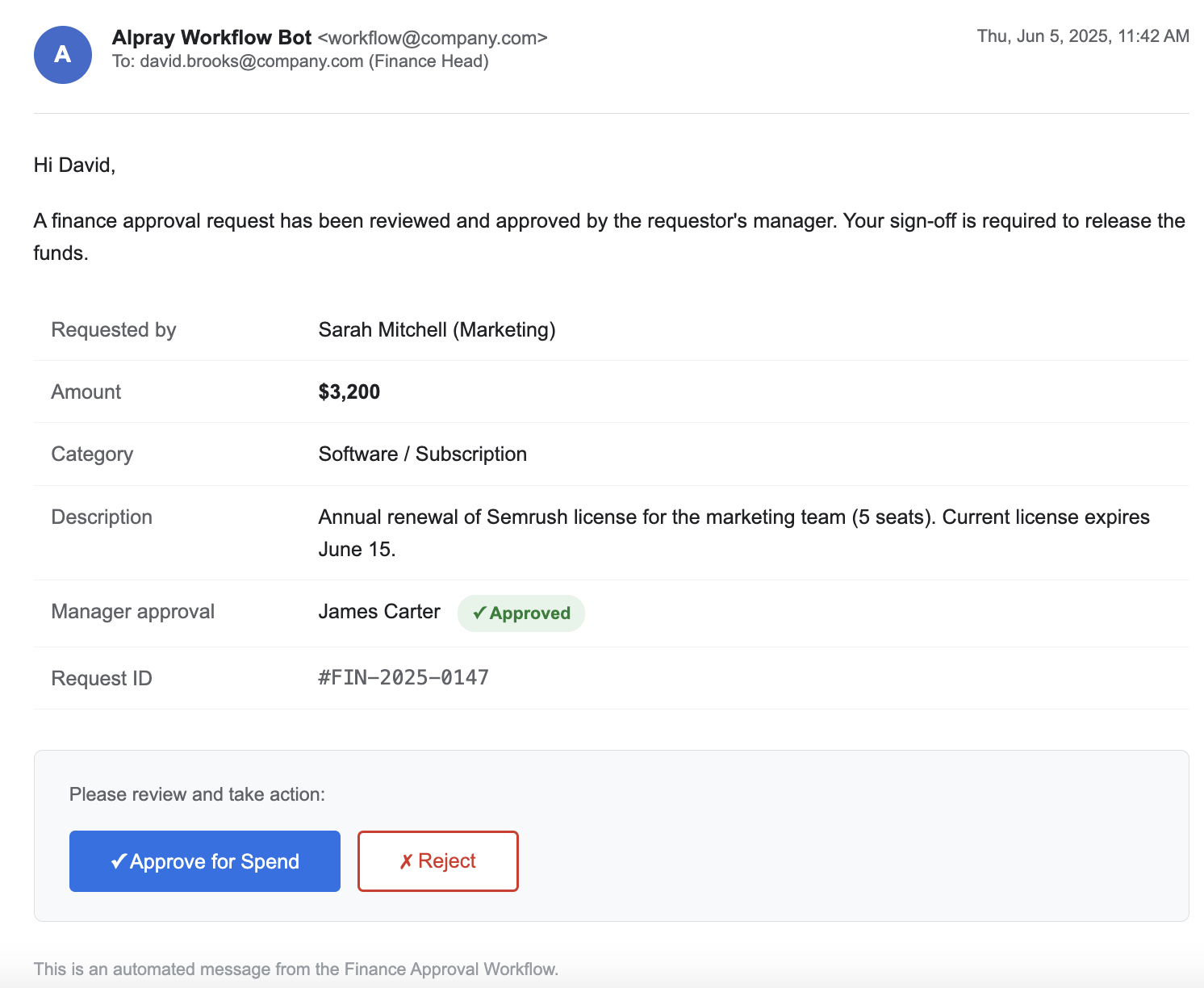
Tools like Kissflow or Monday.com handle this but start at $10–20 per user per month. The team was already on Google Workspace. We built the entire workflow in Apps Script in a day.
Architecture
Four moving parts:
- Google Form — requestor fills in amount, purpose, their email, manager's email
- Google Sheet — form responses land here; this is the source of truth with a Status column tracking every request through its lifecycle
- Apps Script (form trigger) — fires on submission, emails the manager with approve/reject links
- Apps Script (web app) — the approve/reject links point here; handles button clicks, escalation, and rejection reason collection
The Status column is the state machine:
Pending Manager → Pending Finance Head → Approved
                          ↓                      ↓
                       Rejected             Rejected
Sheet Setup
The Google Form collects:
- Requestor Name
- Requestor Email
- Manager Email
- Amount
- Purpose / Description
- Cost Centre
Beyond the form columns, add these manually to the Sheet:
- Column H: Status
- Column I: Token
- Column J: Rejection Reason
Adjust the column indices in the script constants below to match your actual sheet layout.
Need this built for your team? We set up approval workflows like this in a day — customized to your form fields, approval chain, and rejection flow.
Get in touchThe Code
Open the Sheet → Extensions → Apps Script. Paste the following. Replace the constants at the top with your values.
// ── Constants ────────────────────────────────────────────────
var SHEET_NAME       = "Form Responses 1";
var STATUS_COL       = 8;   // Column H
var TOKEN_COL        = 9;   // Column I
var REASON_COL       = 10;  // Column J
var FINANCE_HEAD_EMAIL = "financeHead@yourcompany.com";

// Form column positions (adjust to match your form)
var COL_REQUESTOR_NAME  = 2;
var COL_REQUESTOR_EMAIL = 3;
var COL_MANAGER_EMAIL   = 4;
var COL_AMOUNT          = 5;
var COL_PURPOSE         = 6;
var COL_COST_CENTRE     = 7;
// ─────────────────────────────────────────────────────────────

// Runs on every form submission
function onFormSubmit(e) {
  var sheet = SpreadsheetApp
    .getActiveSpreadsheet()
    .getSheetByName(SHEET_NAME);
  var lastRow = sheet.getLastRow();

  // Generate a unique token for this request
  var token = Utilities.getUuid();
  sheet.getRange(lastRow, TOKEN_COL).setValue(token);
  sheet.getRange(lastRow, STATUS_COL).setValue("Pending Manager");

  var rowData = sheet.getRange(lastRow, 1, 1, REASON_COL).getValues()[0];
  sendToManager(lastRow, rowData, token);
}

function sendToManager(row, rowData, token) {
  var managerEmail   = rowData[COL_MANAGER_EMAIL - 1];
  var requestorName  = rowData[COL_REQUESTOR_NAME - 1];
  var amount         = rowData[COL_AMOUNT - 1];
  var purpose        = rowData[COL_PURPOSE - 1];
  var costCentre     = rowData[COL_COST_CENTRE - 1];
  var webAppUrl      = ScriptApp.getService().getUrl();

  var approveUrl = webAppUrl + "?action=approve&row=" + row
    + "&token=" + token + "&stage=manager";
  var rejectUrl  = webAppUrl + "?action=reject&row=" + row
    + "&token=" + token + "&stage=manager";

  var subject = "Finance Approval Required: " + purpose + " — " + amount;
  var body =
    "A finance approval request requires your sign-off.\n\n" +
    "Requestor:   " + requestorName  + "\n" +
    "Amount:      " + amount         + "\n" +
    "Purpose:     " + purpose        + "\n" +
    "Cost Centre: " + costCentre     + "\n\n" +
    "──────────────────────────────\n" +
    "✅  APPROVE: " + approveUrl + "\n\n" +
    "❌  REJECT:  " + rejectUrl  + "\n" +
    "──────────────────────────────\n\n" +
    "Clicking Reject will ask you for a reason before submitting.";

  GmailApp.sendEmail(managerEmail, subject, body);
}

function sendToFinanceHead(row, rowData, token) {
  var requestorName = rowData[COL_REQUESTOR_NAME - 1];
  var amount        = rowData[COL_AMOUNT - 1];
  var purpose       = rowData[COL_PURPOSE - 1];
  var costCentre    = rowData[COL_COST_CENTRE - 1];
  var webAppUrl     = ScriptApp.getService().getUrl();

  var approveUrl = webAppUrl + "?action=approve&row=" + row
    + "&token=" + token + "&stage=finance";
  var rejectUrl  = webAppUrl + "?action=reject&row=" + row
    + "&token=" + token + "&stage=finance";

  var subject = "Finance Head Approval Required: " + purpose + " — " + amount;
  var body =
    "This request has been approved by the line manager and requires your final sign-off.\n\n" +
    "Requestor:   " + requestorName + "\n" +
    "Amount:      " + amount        + "\n" +
    "Purpose:     " + purpose       + "\n" +
    "Cost Centre: " + costCentre    + "\n\n" +
    "──────────────────────────────\n" +
    "✅  APPROVE: " + approveUrl + "\n\n" +
    "❌  REJECT:  " + rejectUrl  + "\n" +
    "──────────────────────────────";

  GmailApp.sendEmail(FINANCE_HEAD_EMAIL, subject, body);
}

function notifyRequestor(rowData, decision, reason) {
  var requestorEmail = rowData[COL_REQUESTOR_EMAIL - 1];
  var requestorName  = rowData[COL_REQUESTOR_NAME - 1];
  var amount         = rowData[COL_AMOUNT - 1];
  var purpose        = rowData[COL_PURPOSE - 1];

  var subject, body;
  if (decision === "approved") {
    subject = "✅ Finance Request Approved: " + purpose;
    body =
      "Hi " + requestorName + ",\n\n" +
      "Your finance request has been fully approved.\n\n" +
      "Amount:  " + amount  + "\n" +
      "Purpose: " + purpose + "\n\n" +
      "You are cleared to proceed with the spend.";
  } else {
    subject = "❌ Finance Request Rejected: " + purpose;
    body =
      "Hi " + requestorName + ",\n\n" +
      "Your finance request has been rejected.\n\n" +
      "Amount:  " + amount  + "\n" +
      "Purpose: " + purpose + "\n\n" +
      "Reason: " + reason   + "\n\n" +
      "Please revise your request and resubmit if needed.";
  }

  GmailApp.sendEmail(requestorEmail, subject, body);
}

// Web app — handles all button clicks
function doGet(e) {
  var action = e.parameter.action;
  var row    = parseInt(e.parameter.row);
  var token  = e.parameter.token;
  var stage  = e.parameter.stage;
  var reason = e.parameter.reason || "";

  var sheet = SpreadsheetApp
    .getActiveSpreadsheet()
    .getSheetByName(SHEET_NAME);
  var rowData       = sheet.getRange(row, 1, 1, REASON_COL).getValues()[0];
  var storedToken   = rowData[TOKEN_COL - 1];
  var currentStatus = rowData[STATUS_COL - 1];

  // Validate token — prevents anyone with a forwarded email from approving
  if (token !== storedToken) {
    return HtmlService.createHtmlOutput(
      "<h2>Invalid or expired link.</h2>" +
      "<p>This approval link is no longer valid.</p>"
    );
  }

  // Prevent double-processing — if manager clicks approve twice,
  // the status is already "Pending Finance Head" on the second click
  if (stage === "manager" && currentStatus !== "Pending Manager") {
    return HtmlService.createHtmlOutput(
      "<h2>Already processed.</h2>" +
      "<p>This request has already been actioned.</p>"
    );
  }
  if (stage === "finance" && currentStatus !== "Pending Finance Head") {
    return HtmlService.createHtmlOutput(
      "<h2>Already processed.</h2>" +
      "<p>This request has already been actioned.</p>"
    );
  }

  // ── APPROVE ──────────────────────────────────────────────────
  if (action === "approve") {
    if (stage === "manager") {
      sheet.getRange(row, STATUS_COL).setValue("Pending Finance Head");
      sendToFinanceHead(row, rowData, storedToken);
      return HtmlService.createHtmlOutput(
        "<h2>✅ Approved.</h2>" +
        "<p>Request escalated to the Finance Head for final approval.</p>"
      );
    }
    if (stage === "finance") {
      sheet.getRange(row, STATUS_COL).setValue("Approved");
      notifyRequestor(rowData, "approved", "");
      return HtmlService.createHtmlOutput(
        "<h2>✅ Fully Approved.</h2>" +
        "<p>The requestor has been notified and is cleared to spend.</p>"
      );
    }
  }

  // ── REJECT — step 1: show reason form ────────────────────────
  if (action === "reject") {
    var webAppUrl = ScriptApp.getService().getUrl();
    var html =
      "<h2>Reject Request</h2>" +
      "<p>Please provide a reason. The requestor will receive this by email.</p>" +
      "<form method='GET' action='" + webAppUrl + "'>" +
      "<input type='hidden' name='action' value='reject_confirm'>" +
      "<input type='hidden' name='row' value='" + row + "'>" +
      "<input type='hidden' name='token' value='" + token + "'>" +
      "<input type='hidden' name='stage' value='" + stage + "'>" +
      "<textarea name='reason' placeholder='Reason for rejection' required " +
      "style='width:100%;height:120px;padding:8px;font-size:14px;'></textarea><br><br>" +
      "<button type='submit' style='padding:10px 24px;background:#c0392b;color:#fff;" +
      "border:none;border-radius:4px;font-size:14px;cursor:pointer;'>" +
      "Submit Rejection</button>" +
      "</form>";
    return HtmlService.createHtmlOutput(html);
  }

  // ── REJECT — step 2: process the reason ──────────────────────
  if (action === "reject_confirm") {
    var rejectionReason = reason || "No reason provided";
    sheet.getRange(row, STATUS_COL).setValue(
      "Rejected by " + (stage === "manager" ? "Manager" : "Finance Head")
    );
    sheet.getRange(row, REASON_COL).setValue(rejectionReason);
    notifyRequestor(rowData, "rejected", rejectionReason);
    return HtmlService.createHtmlOutput(
      "<h2>❌ Request Rejected.</h2>" +
      "<p>The requestor has been notified with your reason.</p>"
    );
  }

  return HtmlService.createHtmlOutput("<h2>Invalid request.</h2>");
}
Deployment
- In the Script editor → Deploy → New deployment
- Type: Web app
- Execute as: Me
- Who has access: Anyone (the token makes it secure — the URL alone is useless without a valid token)
- Copy the web app URL — the script uses
ScriptApp.getService().getUrl()so it self-references, but verify this is correct after deployment - Set up the onFormSubmit trigger: Triggers → Add trigger →
onFormSubmit→ From form → On form submit
Why the Token Matters
The approve/reject links go into email. Email gets forwarded. Without a token, anyone who receives a forwarded copy of the approval email can approve or reject the request — including the requestor themselves.
Each request gets a UUID generated at submission time and stored in the Sheet. Every web app request validates this token before doing anything. A mismatched token gets a generic "invalid link" response with no information about the actual request.
Tokens are single-use in practice because the status check runs before the token check would matter a second time — once a request moves to "Pending Finance Head", the manager's approve link is inert even if the token is valid.
Why the Reject Link Opens a Form
Email clients can't collect input. You can't put a text field inside an email. The options are:
- Send rejection without a reason (bad — requestor has no idea what to fix)
- Ask the approver to reply to the email with a reason (unreliable, hard to parse programmatically)
- Have the reject link open a page that collects the reason, then processes it
The reject link opens a minimal HTML form served by the web app itself — just a textarea and a submit button. The approver types their reason, submits, and the web app handles the rest: updates the sheet, emails the requestor. The whole interaction takes 15 seconds.
Gotchas
Manager double-clicks Approve
The status check catches this. On the first click, status moves from "Pending Manager" to "Pending Finance Head". On the second click, the script sees the status is no longer "Pending Manager" and returns "Already processed." The finance head receives only one email.
Manager email is wrong or bounces
Apps Script's GmailApp.sendEmail doesn't throw on bounce — it silently fails. Add a validation step on the form (dropdown of manager emails, or a lookup from a config sheet) rather than a free-text email field. We used a dropdown of manager names mapped to emails in a separate config sheet to avoid this entirely.
Manager is on leave
This implementation doesn't handle delegation. If the manager is on leave, the request sits as "Pending Manager" indefinitely. The practical fix used here: a daily trigger that emails a reminder for any request that's been pending for more than 48 hours. The manager can then forward the email to their cover — the token is still valid.
Web app URL changes on new deployment
Every time you create a new deployment (not a new version of the same deployment), the URL changes. Outstanding approve/reject links from old emails will break. Always deploy as a new version of the same deployment, not a new deployment, to keep the URL stable.
What This Replaced
70 requests per month going through ad-hoc email chains. No audit trail, no visibility into what was pending, no consistent rejection communication. The Sheet now gives the finance team a live view of every request and its current status. The whole build — form, script, web app, testing — took one day.
When to Use This vs. a Proper Tool
Use this approach when:
- You're already on Google Workspace
- The approval chain is fixed (2 levels, known approvers)
- Volume is moderate (under a few hundred requests/month)
- You don't need a SLA dashboard or compliance audit export
Pay for a tool when:
- Approval chains are dynamic (different approvers based on amount, department, etc.)
- You need formal audit trails for compliance
- Volume is high enough that a 6-minute script timeout becomes a risk
- Non-technical staff need to modify the workflow themselves
If you're running a similar workflow and want to adapt this for your approval chain, get in touch.
Adding AI to approval workflows — where it actually helps
For most finance approval workflows, rule-based logic is the right call. But there's one specific point where AI adds value: rejection reason classification. If you're collecting free-text rejection reasons and want to auto-categorise them (budget, policy, missing info) for reporting — that's a legitimate Claude API use case. Two API calls per rejection, roughly $0.001 each. Everything else in this workflow — routing, token validation, email triggers — is deterministic and doesn't benefit from AI. See the full decision framework →
Running approvals through email threads or a shared spreadsheet? That's the exact problem this solved — no audit trail, no accountability, requests getting lost. If your team is processing more than 20–30 requests a month this way, it's worth a conversation.
Talk to us