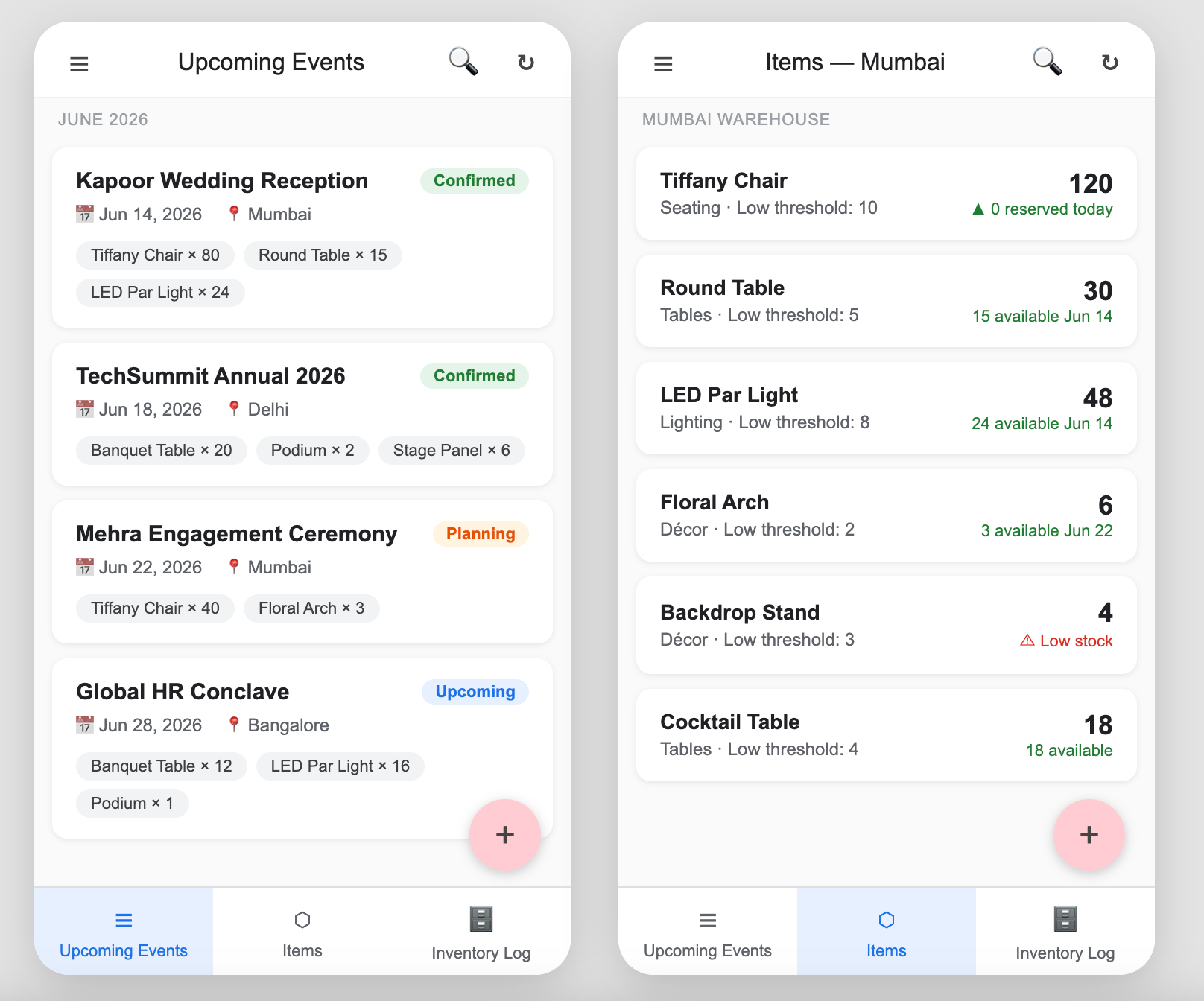
The Problem
An event company operating across 7 cities had no reliable way to track which props were available for an upcoming event. They had 25 prop types — chairs, tables, lighting rigs, backdrops, audio equipment — spread across city-specific warehouses. Events were booked months in advance and coordinators were routinely double-booking props, only discovering the conflict when a warehouse team went to pull inventory.
The process was spreadsheets + WhatsApp. A coordinator would message the city warehouse, someone would manually check, reply back, and update a shared sheet. No one had visibility into what was reserved vs. available without calling someone.
They needed:
- A central place to manage props per city (add, update, delete)
- Event creation with prop assignment — including specific quantities per prop
- Automatic availability blocking — if 8 of 20 chairs are booked for Event A on June 10, only 12 should be available for Event B on June 10
- Low inventory alerts when physical stock falls below a threshold
- Role-based access — 4 roles across the org with different visibility and permissions
Why AppSheet
The client asked for AppSheet. They were already on Google Workspace — and AppSheet Core is included in most Google Workspace Business and Enterprise plans, so for them it came at almost no additional cost. No new vendor, no new contract, no monthly SaaS fee to justify.
It was also the right technical fit: no external APIs needed, all data lives in Google Sheets, warehouse staff could use it on phones without installing anything beyond the AppSheet app, and the automation layer handles notifications natively. If they'd needed complex logic across many third-party integrations we'd have looked at something else — but this was contained enough that AppSheet handled it cleanly.
Data Model
Three core tables:
Props — one row per prop type per city:
PropID | PropName      | City      | TotalQty | LowStockThreshold
P001   | Tiffany Chair | Mumbai    | 50       | 10
P002   | Round Table   | Delhi     | 20       | 5
P003   | LED Par Light | Mumbai    | 30       | 8
Events — one row per event:
EventID | EventName        | City   | EventDate  | CoordinatorEmail
E001    | Sharma Wedding   | Mumbai | 2026-07-15 | riya@events.com
E002    | TechConf Annual  | Delhi  | 2026-07-20 | arjun@events.com
Event_Props — junction table, one row per prop per event:
RecordID | EventID | PropID | ReservedQty
R001     | E001    | P001   | 30
R002     | E001    | P003   | 12
R003     | E002    | P002   | 8
Keeping city inventory fully separate was intentional. Props don't move between cities — each warehouse is independent. This kept the availability formula simple and made city-scoped access control straightforward.
The Availability Formula
Every prop row needed a virtual column showing how many units were still available on a given event's date. The formula on the Event_Props table computes available qty at the time of assignment:
AvailableQty =
  LOOKUP([PropID], Props, PropID, TotalQty)
  - SUM(
      SELECT(
        Event_Props[ReservedQty],
        AND(
          [PropID] = [_THISROW].[PropID],
          LOOKUP([EventID], Events, EventID, EventDate)
            = LOOKUP([_THISROW].[EventID], Events, EventID, EventDate),
          [RecordID] <> [_THISROW].[RecordID]
        )
      )
    )
Breaking it down:
- LOOKUP(...TotalQty) — gets the total physical stock for this prop
- SELECT(...same PropID, same EventDate, different record) — sums up all other reservations for the same prop on the same date
- The result is how many units are free for this event
We added a validation rule on ReservedQty: [ReservedQty] <= [AvailableQty]. AppSheet blocks the save and shows an error if a coordinator tries to assign more than what's available. No double-booking possible.
The Prop Assignment UX — and Why It's Two Steps
This was the trickiest part of the build. The coordinator needs to select which props to assign to an event AND specify a quantity for each. The natural instinct is a single form with checkboxes — pick your props, enter qty next to each. AppSheet doesn't support that. An EnumList field gives you checkbox-style multi-select, but it's a flat list of values — you can't attach individual data (like qty) to each selected item in the same field.
The solution was a two-step flow:
Step 1 — Select props
From the event detail view, the coordinator taps "Add Props". A form opens with an EnumList of all props available in that city. They check all the props they need. Each checked prop creates a row in Event_Props with ReservedQty = 0.
Step 2 — Set quantities
Back on the event detail view, an inline table shows all assigned props with their current reserved qty and available qty. The coordinator taps each row and enters the quantity. The validation formula runs on save — if they enter more than available, AppSheet blocks it.
It's one extra tap compared to a single form, but it works reliably and the inline view gives coordinators a clear picture of what they've assigned and how much headroom is left per prop.
Low Inventory Alerts
AppSheet's built-in automation handles this. A scheduled bot runs daily and checks each prop row:
Condition: [TotalQty] <= [LowStockThreshold]

Action: Send email to City Manager
Subject: Low stock alert — [PropName] in [City]
Body: Only [TotalQty] units remaining. Threshold: [LowStockThreshold].
We deliberately used TotalQty (physical stock) rather than available qty for the alert. The goal was to flag when physical stock was running low and needed reordering — not when stock was reserved for an event. Those are two different problems.
The 4 Roles
Access is controlled via a Users table with a Role column. AppSheet's security filters and column-level permissions enforce what each role can see and do.
Admin
- Full access across all cities — all props, all events, all users
- Can add/edit/delete props, events, and user accounts
- Sees all city dashboards
City Manager
- Scoped to their city only —
USEREMAIL() = [ManagerEmail]or city field match - Can manage props for their city (add, edit qty, set thresholds)
- Can see all events in their city
- Receives low stock alerts
Event Coordinator
- Can create and manage events
- Can assign props to events (the two-step flow)
- Can see prop availability but cannot edit base inventory (TotalQty is read-only for this role)
- Scoped to their city
Warehouse Staff
- Can update TotalQty (when stock arrives or is damaged)
- Cannot create events or assign props
- No access to coordinator or financial views
- Scoped to their city
The key separation: coordinators can read inventory and assign props, but they can't change the physical stock count. Warehouse staff can update stock but can't touch event assignments. Only city managers and admins cross both.
Building something similar? We build AppSheet apps for operations teams — inventory, field workflows, approval flows. If you're scoping one out, we can help figure out the right data model before you start.
Get in touchWhat We'd Do Differently
The two-step prop assignment works, but it's slightly awkward when coordinators are in a hurry. If we were building this again we'd explore AppSheet's inline add with a pre-populated form — creating Event_Props rows directly from the event view with a prop selector and qty field in one action. We tested this during the build but the city-scoped filtering on the prop list got complicated. The two-step flow was cleaner to maintain.
Also: with 25 prop types and events growing month over month, the SELECT formula in AvailableQty starts scanning more rows over time. Not a problem at current scale, but worth keeping in mind if the event volume grows significantly. At that point you'd want to look at whether AppSheet's data source limits become a constraint.
Tracking inventory, equipment, or bookings across locations in a spreadsheet? Once you're managing availability across multiple sites with overlapping dates, a spreadsheet starts breaking in specific ways — double-bookings, no visibility, manual reconciliation. AppSheet solves this without custom dev. We can scope it in one call.
Talk to us